
A Post Failed
A partnership says it failed or needs a retry. What do I do?
1 min readUpdated November 5, 2026
If a post can't go out, nothing is lost. Fix the cause, then retry. Only the failed side posts again.
Find the Error#
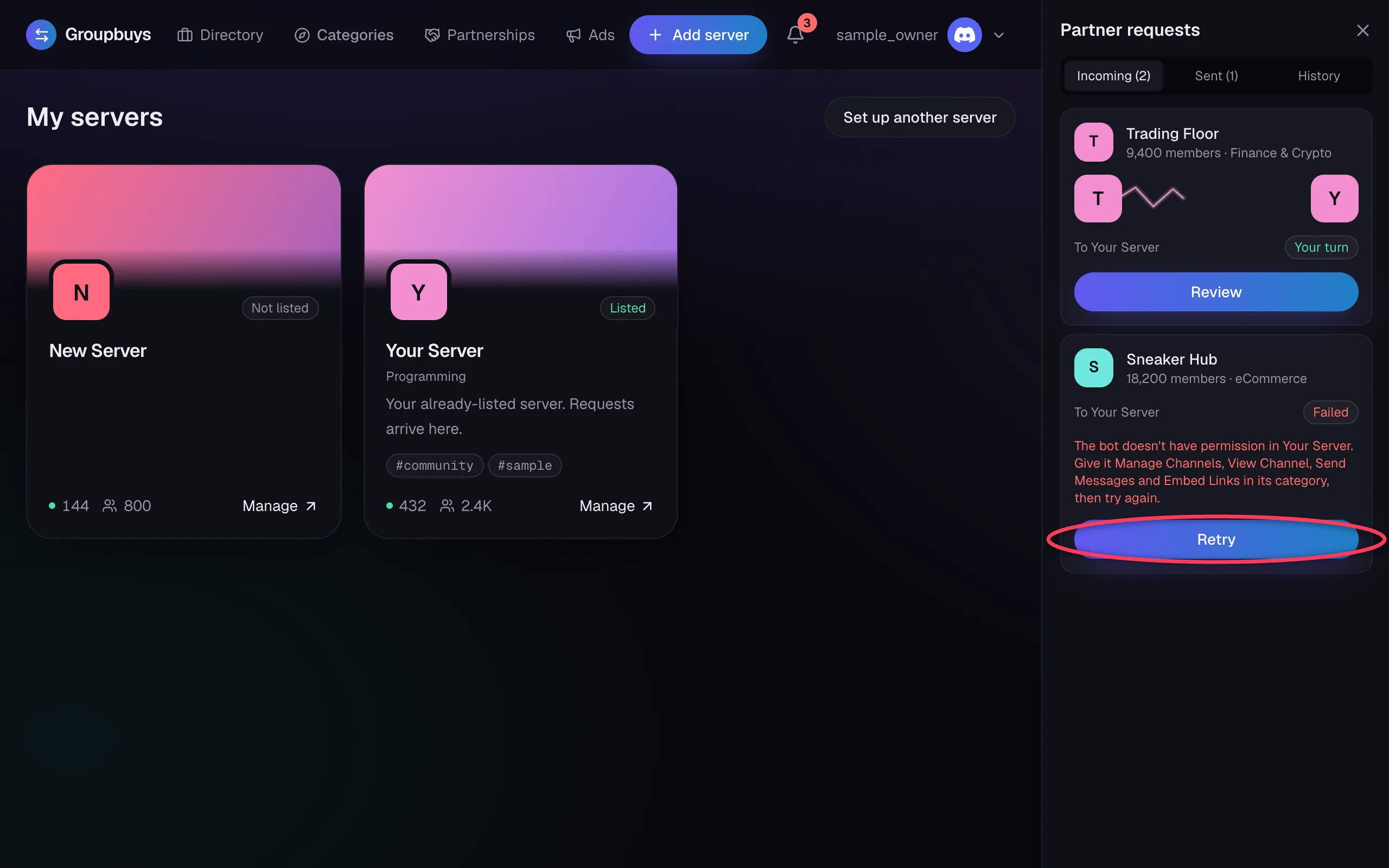
Open the bell. A failed request shows what went wrong, in red, with a Retry button. Only the owner receiving the request, or their PR team, can retry it.
Common Errors#
| Error | What to do |
|---|---|
| The bot doesn't have permission in... | Fix its permissions. See The Bot Is Missing Permissions |
| The bot is no longer in... | Add the bot back to that server |
| ...has changed owner | The new owner has to finish setup |
| ...hasn't finished channel setup | That owner needs to finish setting up |
| Discord couldn't complete this | Discord had a hiccup. Wait a minute and retry |
Won't It Post Twice?#
No. Each side is recorded as soon as it posts, and a retry skips anything already up.
"That Request Is No Longer Open"#
The other owner cancelled or changed it while you had the page open. Reload to see where it stands.
Was this article helpful?
NextThe Bot Is Missing PermissionsStill stuck?
Talk to a person. Open a support ticket in our Discord, or ask the community there.